

AISBackup: Registration Options
This page describes how you register the trial of AISBackup, apply for a re-trial key to extend the 30 day trial period and how to enter the supplied key's into AISBackup.
Please select the option you require:
Registering AISBackup prior to purchase .
These instructions are for version 1.0.4.118 or greater of AISBackup. The latest version may be downloaded from here. To check which version you are using select the menu option Help / About.
New from version 1.0.5:
We no longer require your registration details if you have purchased AISBackup, however, registering your program enables us to send upgrade information based upon the version you are using. Registering AISBackup does not commit you to purchasing the product and instructions are given to enable you to have your information removed from our database. No registration information is stored on our web-server.
You must send us registration details for the Re-trial option.
When you first download and use AISBackup a 30 trial period starts. This trial period is for 30 different days and not 30 elapsed days. AISBackup may be used as many times on each day as you like.
When you purchase AISBackup you are sent a Key that finishes the 30 day trial and enables you to use AISBackup freely on the registered PC.
To register AISBackup select the menu option Tools / Program Activation Options. This option is only available during the 30 day trial, if the 30 day trial has expired the Re-Trial option must be used.

To display the registration form click Register or Re-Register. The Re-Register option is used to cause us to re-send the full registration key if AISBackup has reverted to the 30 day trial (following changes to either the Computer Name or Registered Owners name).
Users who have purchased AISBackup and upgraded to a newer version are also requested to inform us of the upgrade. If you choose not to send this information when requested you may use the Help / Register option at a later date.
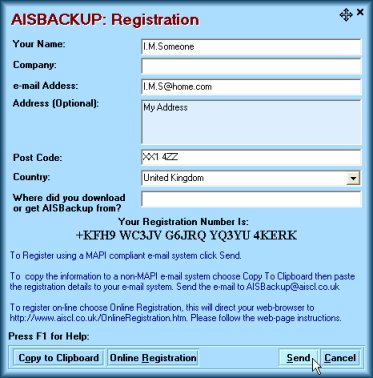
The only mandatory field is the e-mail address. If you wish to purchase AISBackup then you must register the program with us because we need the Registered Owners Name and Computer name of your PC in order to generate your Key, we also need this information if you wish to apply for a re-trial Key. If at this stage if you do not want to register AISBackup with us, please choose Cancel.
Once you have completed the form either:
-
Click Send to place a copy of the registration information into your MAPI compliant e-mail system.
-
If you do not have a MAPI compliant e-mail system, start an e-mail in the normal way, addressing it to aisbackup@aiscl.co.uk and then click Copy to Clipboard then click somewhere in the body of your e-mail then either select Edit / Paste on your e-mail menu bar or while holding down Ctrl the key on your keyboard press V.
-
If you click Online Registration your web-browser will be pointed to the Online Registration page on this web-site, from here click the 'Please paste your Registration Details here' box and then either select Edit / Paste on your web browser menu bar or while holding down Ctrl the key on your keyboard press V.
Re-trial.
If AISBackup trial period has expired prior to you fully evaluating the product, or if the program has stopped working because you have removed and re-installed AISBackup then you may apply for a re-trial key.
To apply for a re-trial key, click Register AISBackup, see below.
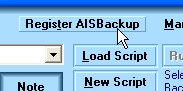
The Registration form is then displayed:
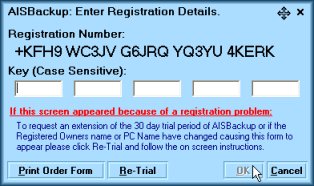
Click Re-trial and the registration form will be displayed.
Go To Registration.
Inputting the Full or Re-trial Key.
Full Key Installation.
For the retrial key click here.
From version 1.0.5 of AISBackup we issue a key file which should be saved to the AISBackup program folder which by default is:
C:\Program Files\Aquarius IS Consultancy\AISBackup
AISBackup will self register the next time it is run.
-
Your key is sent to you as an e-mail attachment.
-
Double click the e-mail to open it.
-
If your e-mail system does not allow attachments to be opened see here for an explanation of how to enable temporarily allow e-mail attachments.
-
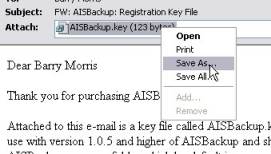
Right click the attachment and choose Save as..
-
Save the key file to the AISBackup program folder.

Re-Trial Key Installation.
These instructions are for version 1.0.4.118 or greater of AISBackup. The latest version may be downloaded from here. To check which version you are using select the menu option Help / About.
Once you are in receipt of the e-mail containing your registration key or re-trial key you must apply it to AISBackup by using the following procedure.
Select the menu option Register AISBackup to display the Registration Details form.
The e-mail contains a Registration Number and a Key, the Registration Number should match exactly the displayed Registration Number the key should be typed into the Key (Case Sensitive) boxes of the Registration Details form.
Alternatively you may select the Key directly from the e-mail and paste it into the first box of the Key, see below. The numbers will automatically span the rest of the boxes.
If the Key does not contain a total of 20 characters the OK button is disabled.

Applying for a key if the trial period has expired.
The procedure for obtaining a re-trial key when the AISBackup trial period has expired is:
Click Register AISBackup, see below.
The Registration form is then displayed:
Click Re-trial and the registration form is displayed. Submitting a re-trial will cause us to return a full registration key for owners of AISBackup.
Go To Registration.