

AISBackup: Managed Data Backup Program.
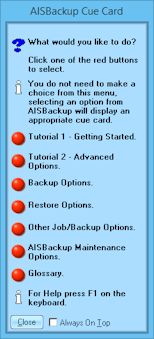
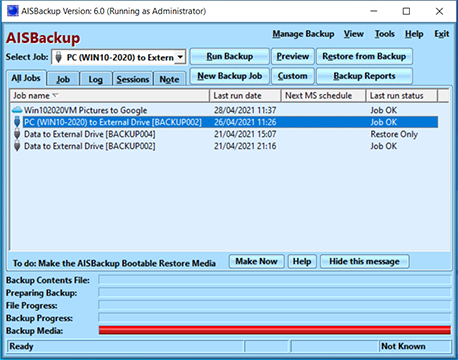
Cue Card and AISBackup main form.
Why Use AISBackup? Benefit summary:
- One product for PC and Server backup: AISBackup is suitable for Windows PC backup and Windows Server backup within the same low cost, high value product, including the backup and restore of application data like SQL Server backup and Microsoft Exchange backup, AISBackup provides:
Windows 11, Windows 10, Windows 8, Windows 8.1, Windows 7, Windows Vista, Windows XP backup, Windows 2000, Windows server backup including Windows Server 2019, Windows Server 2016, Windows Server NT4, Windows Server 2000, Windows Server 2003, Windows Server 2008 (+R2), Windows Server 2012 (+R2). AISBackup also supports the old legacy system's Windows 95, Windows 98 Windows ME and Windows NT4.
- Windows Disaster Recovery: PC Disaster recovery to new disk drives using the AISBackup Restore CD or AISBackup Restore USB Flash drive / External disk drive.
Restore or copy Windows to a second partition on the same PC to make a dual or multi-boot system.
Restore compatible 64-bit Windows to an EFI booting GPT disk.
-
Back up as much or as little as you want: AISBackup is capable of backing up everything e.g. backing up the Windows 7 drive (C:), includes the system files and security information. AISBackup can maintain the security of private folders and encrypted files. Some backup solutions do not backup private folders.
Alternatively, it is also possible to backup just one or two files, the Registry on its own or synchronize your documents with a USB flash drive. - Backup to: External disk drives, internal drives, network drives, using the File Transfer Protocols FTP, FTPS and SFTP, Cloud drives that can be accessed using a drive letter, for example Google Drive and pCloud drive and Microsoft One-drive.
- Backup up to any removable media including CD, DVD, Blu-ray, and flash drives: Media spanning to named media is supported. Integrated and third party optical disc support.
- Schedule backups using the Microsoft Task Scheduler: Using the New Backup Job option a backup of the C: drive could be scheduled to run at midnight with just 8 clicks of the mouse, and no typing! A few more clicks and you choose the time of backup. An existing backup job may be scheduled with a few clicks of the mouse.
- Disk to disk cloning and synchronizing: Create a ready to go backup of Windows to another disk drive by using the Tools / Disk to disk copy option, tutorial here. Create a dual boot system - one for play (and possible virus and ad-ware intrusion) and the other for work.
-
Very easily retrieves files from the backup to the original or to a different destination: Drag and drop lets you know exactly where files and folders are going to be restored. Restore a backup of Windows 'over the top' of the current running Windows, or to a new drive or partition.
AISBackup knows where a backed up file is, so if it is on CD 36 AISBackup will ask for CD 36. Right click options lets you open a file directly from the backup. Find files by name across the current or all backup jobs.
When it comes to getting information back from the backup media many backup solutions do not offer the kind of flexibility that AISBackup does. -
AISBackup can backup and restore Windows 2019, 2016, NT4, 2000, 2003, 2008 , 2011 and 2012 Server's: Many system administrators may find this hard to believe, but it makes AISBackup a low cost HIGH value product. There are messages on our forum from happy customers who now use AISBackup, in place of, or to supplement their expensive server based backup solution.
To be fair AISBackup does not support tape, but it does support backup to large external disk drives which can be swapped to make on-site / off-site backups - the next backup session is based on the contents of the connected drive. - Files and folders may be restored using drag and drop: Drag and drop selected files and folders straight onto Windows Explorer so you know exactly where your files are going. This option may be useful to restore a few pictures or documents into a new folder rather than back to their original place. AISBackup 'drops' the files directly to your chosen destination rather than restoring via the 'C' drive like most other products that support drag and drop.
- Restore files to brand new disks that have not already been formatted: AISBackup will create the disk partition and format it for you.
-
All the usual and unusual stuff is there: e.g. Optional Password Protection, Optional Test Backup, Backup to FTP.
Backup to e-mail: backup your important files to your web-mail account to make an off-site backup. - Sophisticated Backup Management: Differs from antiquated traditional backup methods while keeping the benefits of tradition. see here for more details.
-
If like what you've read so far then
 a trial.
For more read on ....
Benefits in detail:
AISBackup is a program designed to provide backups of your Windows PC and Server Operating System and data to the following media:- USB & Fire-wire connected Hard Drives.
- Cloud drives that use a drive letter.
- Local Hard Drives.
- Network Drives.
- Internet or Intranet File Transfer Protocol (FTP, FTPS and SFTP) Servers.
- CD, DVD, Blu-ray and drives that emulate CD.
Tape drives are not supported.
System Requirements
For a detailed list of system requirements click here.
Key Benefits
- Easily create backup jobs to describe backups of individual files and folders or complete PC system's.
- Familiar 'Explorer' style interface for selecting files for Backup and Restore.
- Create disaster recovery backups of Windows.
- Windows 11, 10, 8.1, 8, 7, Vista, XP, 2000, Server 2003, 2008, 2012, 2016, 2019 backups can be restored 'over the top' of the running Windows system in most cases, however some files cannot be replaced this way so use the AISBackup restore CD or AISBackup restore USB flash drive instead.
- Subsequent backup's only add files that are new or have changed, this substantially reduces the time required to backup the files.
- The ability to limit the backup to recently created or modified files only.
- Optionally backup files that that are larger than the backup media (maximum individual file size 100GB).
- Backups can Span multiple CD, DVD and other Media.
- Backs up hidden, read only and system files.
- Optionally back up and restore NTFS file and folder security settings along with Alternate Data Streams. AISBackup gives you access to the individual ADS via Right Click options. For more information about ADS click here.
- If the Operating System or complete boot drive is chosen files referred to as the System State in some other backup program's are backed up.
- AISBackup backs up open exclusive file.
- The backup can be tested for restore capability using the recommended file integrity method or file compare method.
- Optional password protection.
- AISBackup retains all backed up versions of your files so that you can revert to an old copy of a file. Files can easily be restored to a new location or opened directly from the backup using right click menu options. Files and folders can also be restored by selecting them and then dragging and dropping directly onto Windows Explorer.
- Automatically prune the backup destination to keep the size of disk based backups down.
Optionally choose the number of each day's, daily, weekly, monthly and dated backups to retain. Manually prune any backup sessions from a disk based backup. - Each backup is Session based, this means that you can restore your PC back to a particular date. Learn more about AISBackup's session based backup compared to traditional backups here.
- Comprehensive restore options including:
- Restore to the original location, in-use files are replaced after re-booting.
- Restore to a different location.
- Drag and Drop files directly onto Windows Explorer or the Desktop.
- Right Click / Restore As.
- Right Click / Open.
- Right Click / Open With.
- Comprehensive list of duplicate file actions to ensure that you restore only the files you want.
- Cue card system to guide you through the process of taking a backup and performing a restore.
- Easy to set-up and auto run AISBackup using the Microsoft Task Scheduler.
- Disk to Disk copy option can be used to copy a working copy of the Operating System to a new drive or partition. Possible to use an external disk for disaster recovery, see here for more details.
- Administrators may password protect or disable any of AISBackup's options on client PC's. For example: It may be okay for a client to run a backup job, but a password is required to modify the backup job or perform a restore.
- See Features for more details.
CD, DVD & Blu-ray writing methods:
- AISBackup integrated Writer recommended for CD, DVD & Blu-ray (There are some operating restrictions with DVD under some pre-XP versions of Windows, see here.)
- A third party packet writing interface is recommended for DVD and especially for 50GB Blu-ray. Example packet writing system's include: Those built into Windows since Windows Vista, Roxio DirectCD™ or Drag-to-Disc, CeQuadrat PacketCD™, Ahead, Nero InCD, Drive Letter Access. The ability to write directly to CD, DVD and Blu-ray was introduced as part of the Windows operating system since Windows Vista and Windows Server 2008.
Check the documentation to see which interface was supplied with your disc writer. - A third party CD Mastering Application. for example: Roxio Easy CD Creator, Nero Burning ROM and many more. Recommended only if the above methods do not work.
Go get AISBackup
Download AISBackup here. Unregistered copies will work for 30 days.